
How can I export search results and which export formats are available?
As a registered user, you can export search results via Save/Export in the right corner of the top search box:
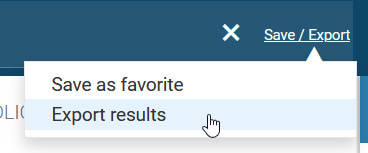
Export options
In the pop-up window, select one of the following options:
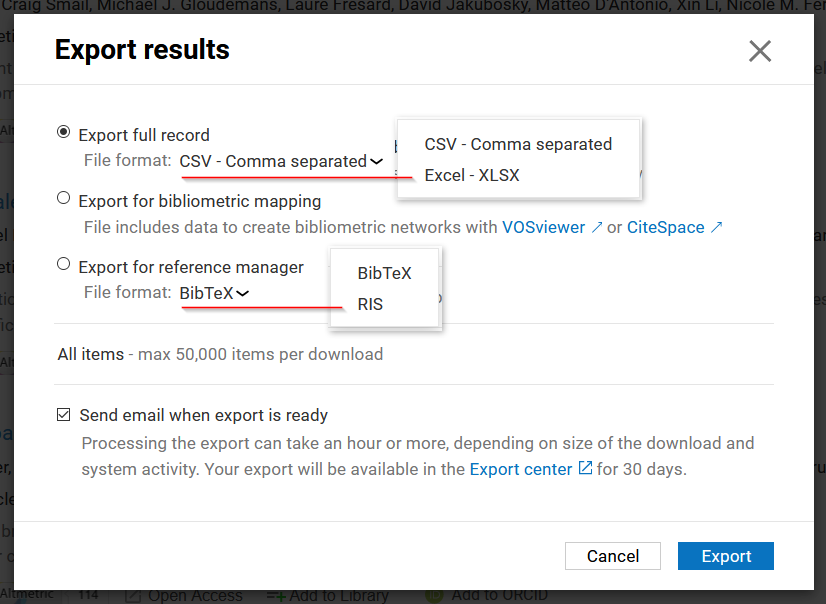
Export full record
Select File format to choose between CSV (comma-separated) or XLSX (Excel).
Export for bibliometric mapping*
Get a file with the data required to create bibliometric networks with VOSviewer or CiteSpace.
Export for reference manager*
Select File format to choose between BibTeX or RIS for files that can be imported into reference management tools.
Get an email when the export is ready
You can opt to be notified via email when your export is ready for download. Exports are available to download in your account's Export center for 30 days.
Export / download limits
Product variant | Full record | Bibliometric Mapping* | Reference Manager* | Analytical Views |
|---|---|---|---|---|
Free | 500 | 2,500 | 500 | n/a |
Plus*** | 5,000 | 5,000 | 5,000 | n/a |
Analytics | 5,000 / 50,000** | 50,000 | 5,000 / 50,000** | 1,000 |
Note on export duration
All export requests are added to a queue. You should receive your export usually within a couple of minutes; however, during peak times of heavy usage it may take up to several minutes for it to be processed. If you haven't received your export file after 6 hours or more, please file a support ticket via Support > Ask for help in the top right.
* Only available for publications.
** Customer-specific setting. If your organization subscribes to Dimensions Analytics and you require the higher download limit, submit a request via Support > Ask for help in the top right.
*** Legacy product variant.